

Sometimes I like to take a step back and look a little harder at something I use almost every day without ever really thinking about it. Take virtual functions, for example, which I was using in C++ long before C# came into existence. C# (and Java) introduced some new keywords to the (somewhat confusing) mix, namely interface and abstract. Think of this post as a refresher on these concepts and their differences.
Interface
MSDN defines an interface as consisting of:
[…] methods, properties, events, indexers, or any combination of those four member types. An interface cannot contain constants, fields, operators, instance constructors, destructors, or types. It cannot contain static members. Interfaces members are automatically public, and they cannot include any access modifiers.
In addition, an interface type does not define any implementation whatsoever. It is a contract only, requiring derived objects to provide the implementation details. It is not possible therefore to instantiate an interface directly. An interface is very much like a class containing pure virtual functions.
As a contract, once an interface is locked down you’ll want to minimize changes to it as any change breaks any classes deriving from it.
As an example, let’s say you want to apply an object model to your pets (if you don’t have pets, why not?). You might start with an interface “IPet”:
1: interface IPet
2: {
3: void Eat();
4:
5: void Run();
6:
7: void Play();
8: }
As you can see the IPet interface only defines methods; it doesn’t provide implementation details.
Now let’s provide an implementation class for this interface by deriving an object from it:
1: public class Dog : IPet
2: {
3: public void Eat()
4: {
5: // eat
6: }
7:
8: public void Run()
9: {
10: // run
11: }
12:
13: public void Play()
14: {
15: // play
16: }
17: }
As you can see, I’ve derived from IPet and implemented the three interface methods, Eat(), Run(), and Play(). I’m required to implement all three of them because of the contract established by the IPet interface. Not doing so will result in a compiler error.
Virtual
The whole point of the virtual keyword is to allow derived classes to override parent functionality and, as objects related by inheritance, for each of those objects to respond differently to the same message (i.e., polymorphism). Virtual class methods can define implementations, but those implementations can be overridden with the override keyword.
I’ll modify my Dog class so that Play() is virtual:
1: public class Dog : IPet
2: {
3: public void Eat()
4: {
5: // eat
6: }
7:
8: public void Run()
9: {
10: // run
11: }
12:
13: public virtual void Play()
14: {
15: // play
16: }
17: }
Then I’ll create a new class called “Labrador” that derives from Dog and uses the override keyword to provide a new implementation of Play() (let’s assume there’s something specific about how labs play that’s different from other dogs):
1: class Labrador : Dog
2: {
3: public override void Play()
4: {
5: // labrador playing
6: }
7: }
I might have another Dog-derived class called Dalmatian and also override the Play() method there. Given a collection, IList<Dog>, made up of both Labrador and Dalmatian objects, I could iterate through this list, call Play() on each of the Dog objects, and have the overridden implementations called rather than the parent class’s implementation.
Here’s the code to do that:
1: IList<Dog> dogCollection = new List<Dog> (4);
2: dogCollection.Add (new Labrador ());
3: dogCollection.Add (new Dalmatian ());
4: dogCollection.Add (new Labrador ());
5: dogCollection.Add (new Dalmatian ());
6:
7: foreach (var dog in dogCollection)
8: {
9: dog.Play();
10: }
Putting that code into a console app and adding some Trace WriteLine’s to each of the overridden Play() methods yields:
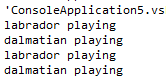
This is polymorphism at its best.
Abstract
An abstract class can contain both implemented members and non-implemented members. Like an interface, an abstract class cannot be instantiated directly. This means that any derived classes must implement any methods defined as abstract in the parent class. Methods that do have implementations in the abstract class can be used as-is by child classes or can be overridden if those methods are defined as virtual.
I modified my Dog class to contain a new abstract method, Chase(), and also made the class abstract since any class that has abstract methods must also be declared abstract.
1: public abstract class Dog : IPet
2: {
3: public void Eat()
4: {
5: // eat
6: }
7:
8: public void Run()
9: {
10: // run
11: }
12:
13: public virtual void Play()
14: {
15: // play
16: }
17:
18: public abstract void Chase();
19: }
If we take a look at the Labrador class, we can see that we now have to provide an implementation for the Chase() method:

Here’s the Labrador class with the new method:
1: public class Labrador : Dog
2: {
3: public override void Play()
4: {
5: Trace.WriteLine ("labrador playing");
6: }
7:
8: public override void Chase()
9: {
10: Trace.WriteLine ("labrador chasing");
11: }
12: }
Abstract differs from virtual in that a virtual method can have an overridable implementation whereas an abstract method has no implementation at all and, as such, abstract methods must be implemented in any derived classes. In effect, an abstract class can have default (non-abstract) implementations that child classes can immediately take advantage of, but also possess abstract methods that a designer wants child classes to have to implement themselves.
Conclusion
Given the above, I wish I could say there is a hard and fast rule for using each of the keywords. The truth is that their use is very design dependent. In a general sense, though, one would use an interface when one wants to enforce a contract, the methods of which must be implemented by all derived classes. One would use virtual when one wants to define default implementation details while allowing for the option of derived classes overriding and defining their own implementations. Last, one would use abstract when one wants to provide default implementation details while also forcing derived classes to provide their own implementation of those methods defined as abstract.
References
- Stackoverflow: What is the difference between abstract function and virtual function?
- Stackoverflow: Why do both the abstract class and interface exist in .Net?
- MSDN: Abstract
- MSDN: Virtual
- MSDN: Interface
Coding Standards & Conventions
This is my attempt to list those resources having to do with coding standards that I’ve found useful.
If you have your own favorites, let me know and I’ll add them or just link them in the comments.
Here’s the list.
.NET/C#
- MSDN: Design Guidelines for Class Library Developers
- Brad Abrams’ Framework Design Guidelines
- .NET Framework Developer’s Guide: Guidelines for Names
- irritatedVowel.com: .NET Programming Standards and Naming Conventions
- Phillips Electronics C# Coding Standard (.pdf)
- IDesign C# Coding Standard (.zip)
- Lance’s Whiteboard: C# Coding Standards
- Custom Control Development: Simple code guidelines
Java
- Coding Conventions for the Java Programming Language
C Sharp Coding Shortcuts
The C# language as well as the Visual Studio environment contain a number of shortcuts meant to ease our development lives. Here’s a few of them.
1. Initializing Variables
Sometimes, it is not necessary to initialize variables because they are already initialized implicitly. For example, writing this is redundant:
1: bool bFlag = false;
A type of ‘bool’ is implicitly initialized to ‘false’, so while adding the “= false” is nice from an explicit standpoint, it is unnecessary.
Further, this is also redundant:
1: string strTestString = string.Empty;
A ‘string’ type is implicitly set to empty (though if class scope it will be null, so be careful).
Also,
1: int i = 0;
Types of ‘int’ are implicitly set to ‘0’;
2. If…Then
Sure, you can code this:
1: if (strYear == null)
2: {
3: return ("null");
4: }
5: else
6: {
7: return (strYear);
8: }
But there’s a more concise shorthand available from the C++ world that was carried into C#:
1: (strYear != null)?strYear:"null"
Even more concise is this C# construct:
1: strYear ?? "null"
A full example might be:
1: StringBuilder sb = new StringBuilder();
2: sb.AppendFormat ("Year [{0}]", strYear ?? "null");
3. Use TAB to Add Event Handlers
You can add event handlers by hand, or you can take advantage of the “Press TAB to insert” functionality.
Say you’ve got a button to which you want to add the “Click” event. Once you’ve typed the below “b.Click +=” you’ll see a little pop-up prompting you to hit TAB to insert.

Hitting TAB will get you to here:

Hitting TAB again will give you the final code, which includes the event handler itself:
1: protected void Page_Load(object sender, EventArgs e)
2: {
3: Button b = new Button();
4:
5: b.Click += new EventHandler (b_Click);
6: }
7:
8: void b_Click (object sender, EventArgs e)
9: {
10: throw new NotImplementedException ();
11: }
4. Use var to declare variables (C# 3.0 specific)
From the MSDN documentation:
Beginning in Visual C# 3.0, variables that are declared at method scope can have an implicit type var. An implicitly typed local variable is strongly typed just as if you had declared the type yourself, but the compiler determines the type.
What that means is if you have this:
1: string strSampleString = "This is a test";
You could alternatively declare it as:
1: var strSampleString = "This is a test";
This declaration allows the compiler to determine the type behind the scenes, but still at compile time. Also, “var” does not mean “variant”, nor is it late-bound.
More information about implicitly typed variables can be found here.
5.) Use string.IsNullOrEmpty
Instead of writing this:
1: if ( (strId == null) || (strId.Length == 0))
2: {
3: return;
4: }
Use this:
1: if (string.IsNullOrEmpty (strLocatorId))
2: {
3: return;
4: }